BEFORE
Scattered signals
- × Guessing whether the log is current
- × One queue hiding every decision
- × Raw status codes without context
- × Restarts to recover stale state
COMMUNITY OPERATIONS · WITHOUT THE GUESSWORK
VRC Relay turns live instance activity, friend presence, group growth, invite queues, and API responses into one calm, explainable dashboard.
 VRC Relay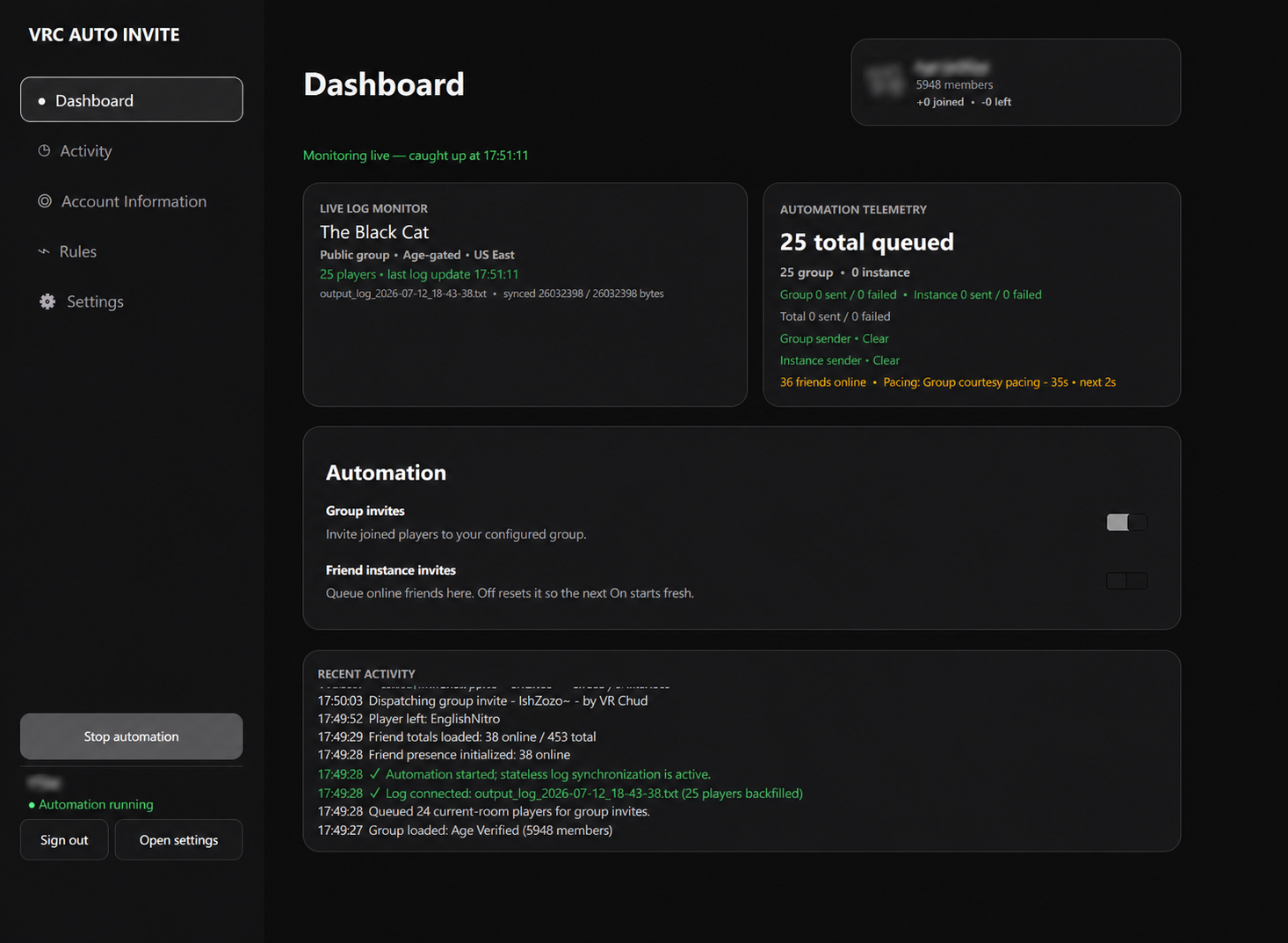
THE OPERATIONS GAP
A fixed script can send a request. A real operations tool should show what it saw, what it queued, which account sent it, why anything paused, and what happens next.
BEFORE
WITH VRC RELAY
BUILT FOR CLARITY
Focused community tooling instead of a sprawling general-purpose companion.
LIVE INSTANCE MONITOR
VRC Relay follows VRChat’s own output log to keep the active world, access type, region, population, joins, leaves, and sync position in view.
TWO QUEUES, TWO SENDERS
Group and friend-instance workflows keep separate queues, accounts, results, safety breaks, and rate-limit cooldowns.
EXPLAINABLE ACTIVITY
Queue decisions, skips, successes, failures, friend presence, room changes, and cooldowns land in one readable timeline.
COURTESY PACING
Duplicate suppression, clear cadence, sender-specific 429 handling, server-directed Retry-After, recovery spacing, and visible safety breaks.
DETACHABLE OVERLAYS
Pop out Players and Recent Activity into separate always-on-top windows, then tune opacity, placement, and size independently.
FROM INSTALL TO SIGNAL
Run the Windows installer, sign in, and let the built-in updater handle future verified packages.
Configure a group ID, enable only the sender you need, and keep their queues and cooldowns independent.
Monitor the room and activity stream while the dashboard explains queued, skipped, sent, failed, and paused work.
PRIVACY WITHOUT FINE PRINT
The app is designed around local state, Windows-protected sessions, and diagnostics that deliberately exclude personal VRChat data.
Inspect the latest release →Passwords are never savedThey are used only during sign-in.
Windows-protected sessionsSession material uses OS credential protection.
Privacy-safe crash reportsNo credentials, names, IDs, cookies, payloads, or VRChat logs.
Verified update packagesSize, repository origin, and SHA-256 digest are checked before install.
STRAIGHT ANSWERS
The short version: native Windows app, no VRCX dependency, no hidden web server, and visible controls for every workflow.
No. It runs as a separate Windows application and reads VRChat’s output log for instance awareness.
No. VRC Relay is VRCX-independent and reads VRChat’s own output log directly.
The affected sender enters its own cooldown, queued work is preserved, and server-provided Retry-After guidance takes priority. The other sender remains independently eligible.
Yes. The activity timeline records duplicate handling, eligibility checks, queue decisions, API results, and room changes in readable language.
No. VRC Relay is an independent community project by RealNumNums and is not affiliated with or endorsed by VRChat Inc.
READY WHEN THE ROOM IS
Free for Windows 10 and 11. Current release: V2.1.8.
Installer · Windows x64 · approximately 50 MB